
12 Common Survey Data Problems Researchers Discover Too Late (And How to Fix Them)
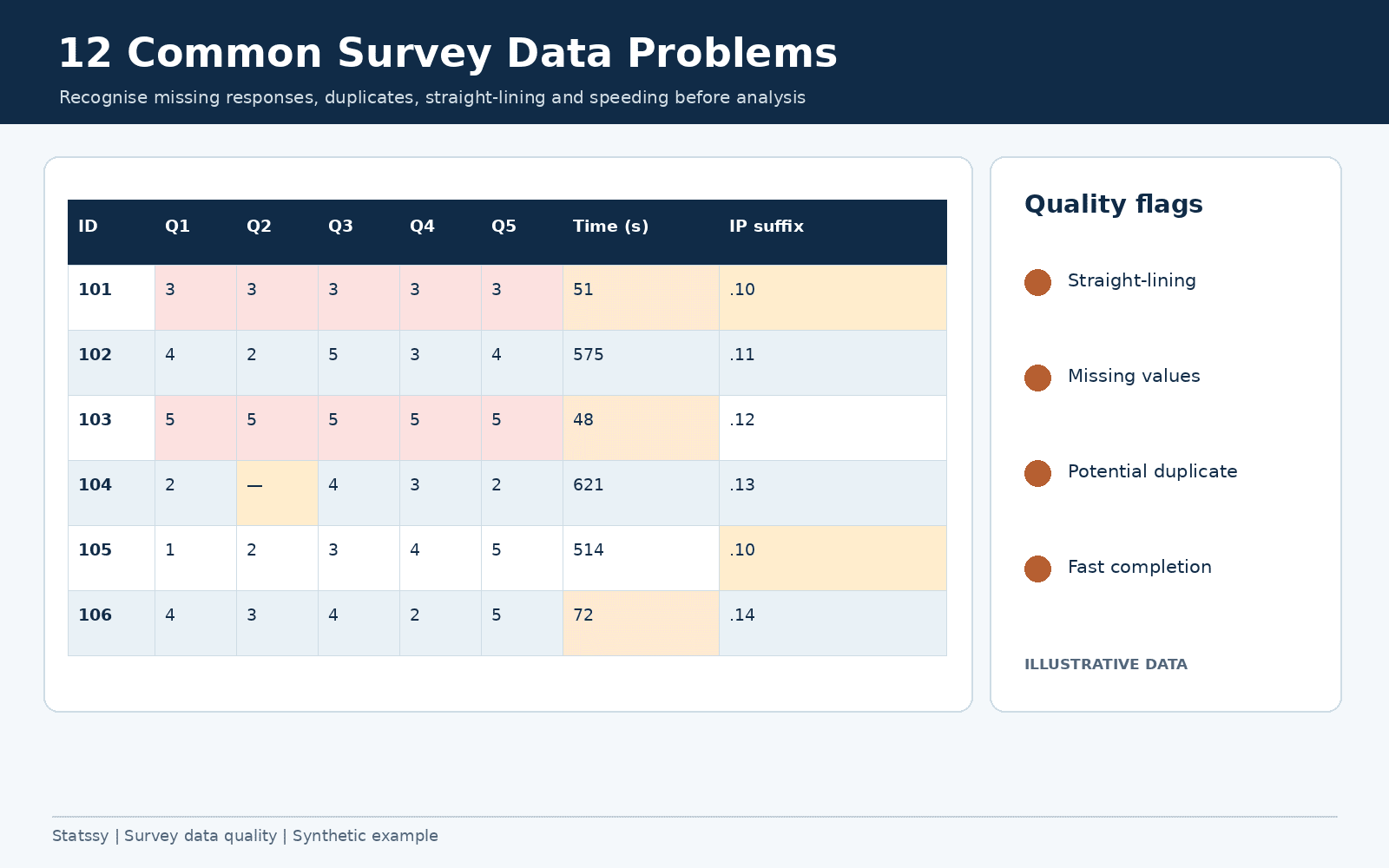
Common survey data problems rarely show up while you are still collecting responses. They show up two or three days before your submission deadline, when you finally open the full dataset and something looks off. I have spent twelve years untangling exactly this moment for dissertation students and working researchers, and the same dozen issues come up again and again. This guide walks through each one, how to spot it in Excel or SPSS, and what you can defensibly do about it.
Common survey data problems are quality issues that only surface after a questionnaire closes, missing responses, duplicate submissions, straight-lined answers, and un-flipped reverse-coded items, all invisible row by row until you look at the dataset as a whole.
Why Survey Data Quality Problems Surface After You’ve Already Collected Responses
Most advice on this topic tells you to pilot your questionnaire carefully and you won’t run into trouble. I partly disagree. A pilot test catches confusing wording and broken skip logic, but it can’t catch how 200 real respondents will actually behave when nobody is watching them fill the form.
Survey data quality problems are a pattern-level issue. A single response row looks fine on its own. It’s only when you stack every row together that you see the respondent who answered every single item with a ‘3’, or the two submissions from the same IP address four minutes apart, or the scale that was supposed to hang together statistically and doesn’t.
During survey research design, you’re focused on whether the instrument measures the right construct. You rarely budget time to audit response patterns until the deadline forces you to open the full file. By then your primary data is already collected, and redoing the survey usually isn’t an option. This is exactly why common survey data problems get caught so late, not because researchers are careless, but because nobody budgets time to look until the deadline forces it.
Missing Data in Survey Research and 11 Other Problems I Flag in Every Dataset
These are the twelve most common survey data problems I see when a client hands me a ‘finished’ dataset. A few are obvious once you know where to look. Most aren’t.
1. Missing Data You Didn’t Notice During Collection
Missing data in survey research means a respondent started the questionnaire but left items blank, skipped a page, or dropped out partway. Not all missingness is equal. Statisticians separate it into three types, missing completely at random (no pattern at all), missing at random (related to another variable you did observe), and missing not at random (related to the missing value itself, which is the dangerous one).
Most blog posts tell you to simply delete any row with a blank cell. I think that’s lazy advice. One client researching workplace burnout deleted 40 incomplete rows out of 220 without checking whether the dropouts were concentrated in one department. They were, and it quietly biased her results.
2. Duplicate Responses From the Same Respondent
Same person, same survey, submitted twice, sometimes because the link was shared in a WhatsApp group, sometimes because the back button got pressed. Sort by IP address and timestamp in Excel, or run Identify Duplicate Cases in SPSS, before you trust your total count. I’ve seen a consumer satisfaction survey where fifteen duplicate submissions from two IP addresses alone inflated one product’s score by nearly half a point.
3. Straight-Lining (Same Answer Down Every Row)
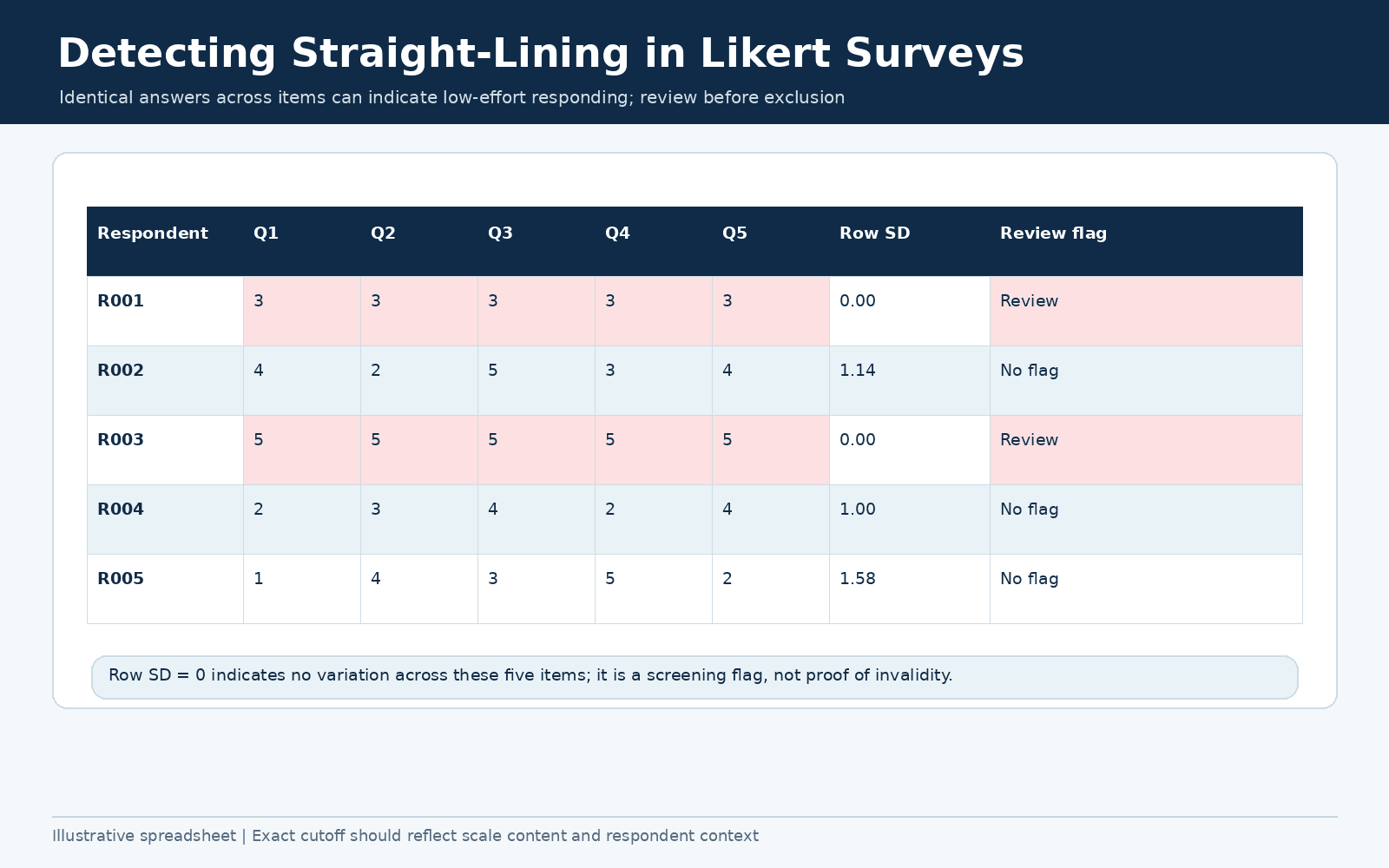
This is when a respondent picks the same point, say ‘neutral’, straight down an entire grid of items without actually reading them. It won’t show up as missing data, because every cell is filled in. What it does is flatten your variance and quietly wreck your scale reliability, the same pattern researchers call acquiescence bias when it shows up as a tendency to agree regardless of content.
Some guides tell you to drop anyone whose row standard deviation falls under a fixed number like 0.5. I don’t use a blanket cutoff. A four-item scale naturally allows less spread than a fifteen-item one, so your threshold has to match the scale you’re actually using, not a number copied from a blog post.
4. Speeding Through the Questionnaire
If your survey should reasonably take fifteen minutes and a response closed in ninety seconds, that person wasn’t reading the questions. Flag anyone who completed in under roughly a third of the median time and look at their answers separately before deciding whether to keep them. Platforms like Qualtrics and SurveyMonkey let you build in attention check items at the design stage, which catches speeders in real time instead of after the fact.
5. Reverse-Coded Items Nobody Flipped
Some items in a validated scale are worded in the opposite direction on purpose, for example ‘I rarely feel anxious’ sitting inside an anxiety scale. These need their scoring reversed before you combine them with the rest of the items. Forget to flip even one, and your total scale score stops meaning anything.
The giveaway is an item-total correlation that comes out negative. That negative number is almost always an un-reversed item, not a genuinely bad item.
6. Inconsistent Questionnaire Responses Across Waves or Research Assistants
Inconsistent questionnaire responses usually trace back to people, not respondents. Two research assistants coding ‘Strongly Agree’ as 5 in one file and as 1 in another, or two coders classifying the same open-ended answer differently. This is entirely preventable with a shared codebook agreed before data entry starts, not patched together after the fact.
7. Insufficient Variation (Restriction of Range)
When almost everyone in your sample answers an item the same way, that variable is statistically close to a constant and can’t correlate with or predict anything. This usually isn’t a cleaning problem at all, it’s a sampling problem discovered too late, often from relying on convenience sampling within one narrow group like a single company or final-year class. Weighing this against stratified or cluster sampling at the design stage would have caught it before data collection even started. No amount of recoding fixes a variable that barely moves.
8. Outliers That Skew Your Averages
Extreme or implausible values, a reported 90-hour work week, an age of 150. Boxplots, z-scores beyond plus or minus 3, or just scanning the minimum and maximum in SPSS Frequencies will surface these quickly. Don’t delete every outlier on reflex though, a CEO genuinely might work 90 hours, so investigate before you decide it’s an error rather than real variation. If you’re also checking whether your data meets the assumptions for your next test, this is a good moment to run a normality check alongside it.
9. Logical Inconsistencies Between Linked Questions
Contradictions between related answers, someone reports zero years of work experience but then rates satisfaction with their ‘current manager’. Cross-tabulate question pairs that should logically depend on each other and look for impossible combinations.
10. Low Internal Consistency (Cronbach’s Alpha Problems)
A Cronbach’s alpha below roughly 0.7 tells you your multi-item scale isn’t hanging together the way the original authors intended it to. The cause is often one of the problems above, straight-lining, an un-flipped reverse item, or a genuinely weak item that needs to be dropped.
11. Sample Size Dropping Below What You Need After Cleaning
Once you’ve removed duplicates, speeders, and incomplete cases, your usable N can fall below what your planned analysis actually needs. This is the moment most students panic. My advice is to check your sample size requirement against your a-priori power calculation before you start deleting rows, not after you’ve already cut forty of them.
12. Undocumented Manual Edits You Can’t Defend to an Examiner
Any manual change to a raw value, recoding an outlier, merging two categories, fixing an obvious typo, that isn’t logged anywhere. An examiner asking why one respondent’s income field reads 45000 when the raw export says 4500, with no record of why you changed it, is the fastest way to have your entire analysis chapter questioned.
Inconsistent Questionnaire Responses and Other Survey Data Cleaning Mistakes to Avoid
The twelve common survey data problems above are what’s wrong with the raw data. These are the survey data cleaning mistakes researchers make while trying to fix it, and in my experience they cause nearly as much damage.
- Deleting rows first and documenting later, usually meaning never. If it isn’t written down the moment you do it, you won’t remember your reasoning in three months when your examiner asks.
- Applying one fixed cutoff rule to every scale regardless of its length. A standard deviation threshold that makes sense for a twelve-item scale is too strict for a four-item one.
- Running imputation without first checking whether the missingness is random. Imputing MNAR data the same way you’d impute MCAR data can introduce more bias than it removes. For MCAR data with only a few gaps, mean substitution is defensible, multiple imputation is the safer default for larger gaps, and regression imputation sits between the two, whichever you pick needs to be named and justified in your methodology chapter, not applied silently.
- Reverse-coding items in one copy of the file and forgetting to carry the fix into the master dataset, so your ‘cleaned’ file and your ‘analysed’ file quietly disagree with each other.
- Treating Likert-scale data as interval-level without checking whether that assumption actually holds for your specific items and response format.
I’d rather see a student keep three messy rows with a documented reason than silently remove them with none.
How to Check Survey Data Quality Before Analysis in Excel
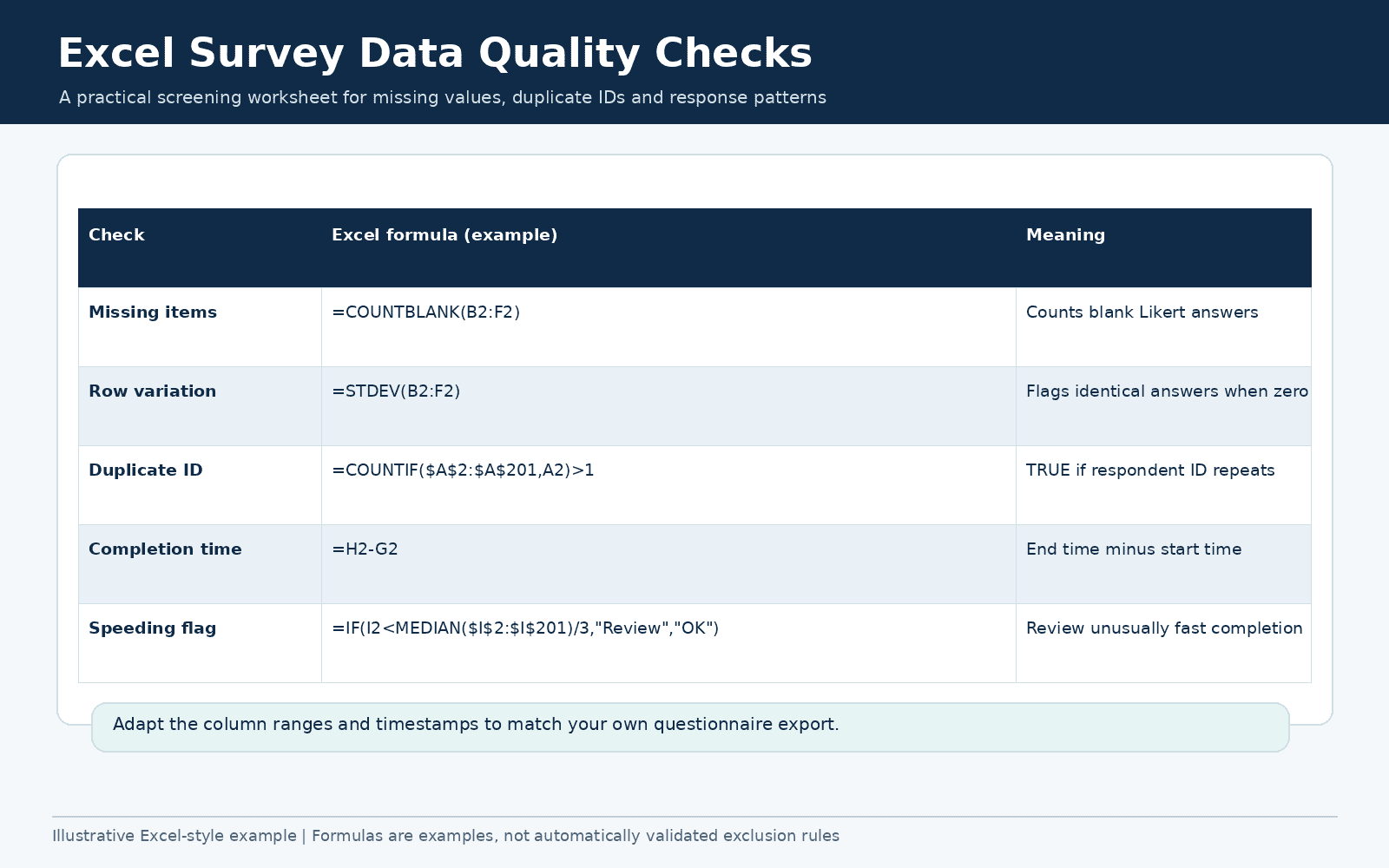
You don’t need SPSS to catch most of these problems. Here is how I catch these common survey data problems before analysis when a client only has Excel.
- Add a COUNTBLANK formula across each respondent’s row to flag missing items, then sort to see who has the most gaps.
- Use Conditional Formatting on your IP address or timestamp column to highlight duplicate values at a glance.
- Add a STDEV formula across a Likert grid for each row. A near-zero result almost always means straight-lining.
- Subtract each respondent’s start and end timestamp, then flag anyone well below the median completion time.
- Use CORREL to compare a suspected reverse-coded item against the rest of its scale. A negative correlation is your signal to flip it.
- Set Data Validation with realistic min and max values on numeric fields like age or hours worked, then filter for anything outside that range.
None of this replaces a proper reliability or missing-value analysis. It just stops you from walking into SPSS with a dataset that’s already compromised.
How to Check These Problems in SPSS, Step by Step
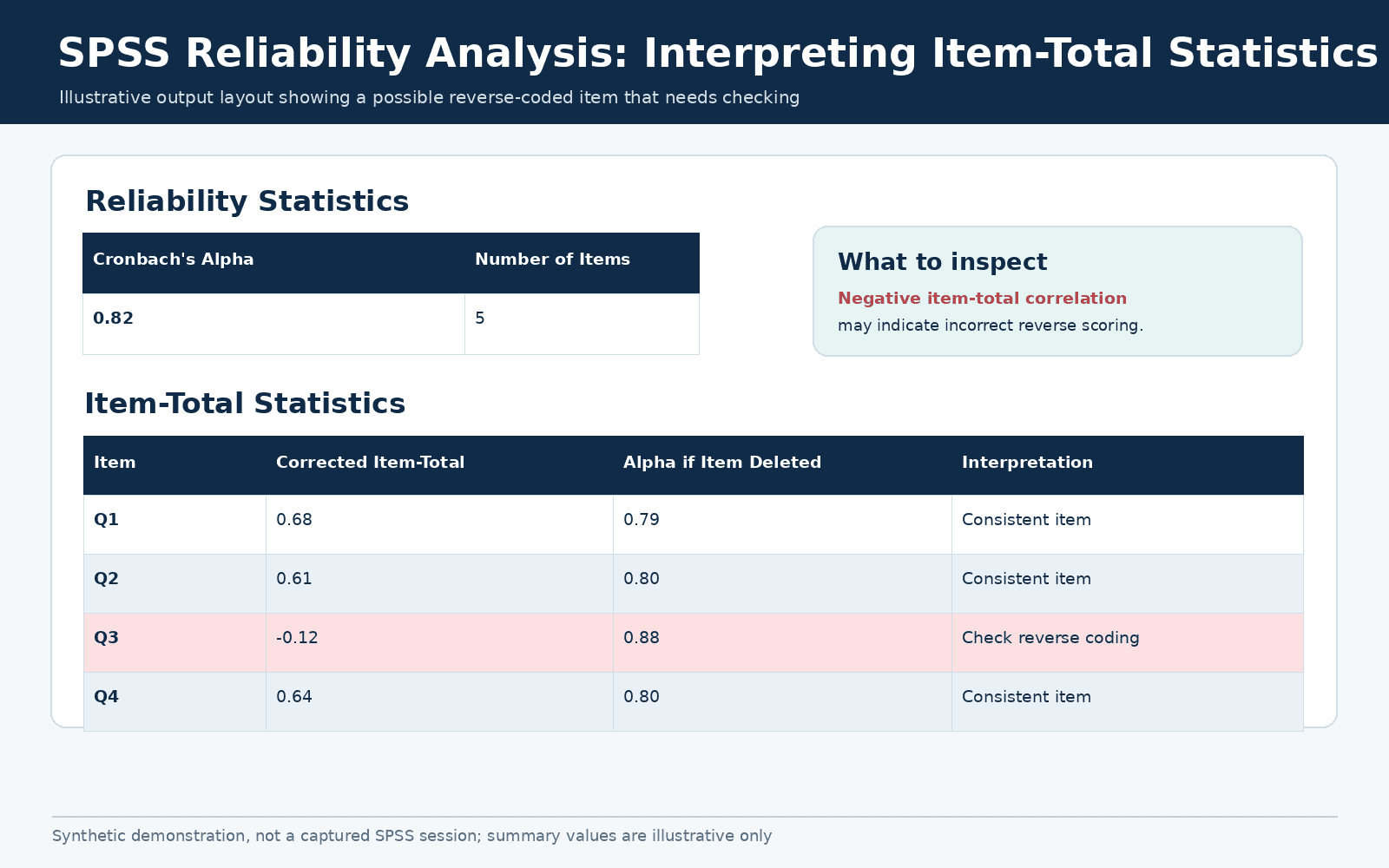
SPSS gives you proper diagnostics instead of workarounds. This is the sequence I run on every client dataset to catch common survey data problems before analysis starts.
- Analyze, Missing Value Analysis, to see the pattern of missingness and run Little’s MCAR test.
- Data, Identify Duplicate Cases, to flag exact or near-exact repeat submissions.
- Transform, Compute Variable, to build a per-row standard deviation across a grid of items, catching straight-liners in one pass.
- Analyze, Scale, Reliability Analysis, for Cronbach’s alpha and, critically, the item-total correlation column that exposes un-reversed items.
- Analyze, Descriptive Statistics, Explore, for boxplots and z-scores that surface outliers.
- Analyze, Descriptive Statistics, Crosstabs, on logically linked question pairs to catch impossible answer combinations.
Run these before you touch your main hypothesis tests, not after. Cleaning that happens after you’ve already run your analysis tends to get rationalised around whatever result you were hoping for, and that’s exactly the trap to avoid.
Which Corrections Are Methodologically Defensible (and Which Aren’t)
This is the question that matters most for common survey data problems, and the one most how-to articles skip. Finding a problem is only half the job, deciding what you’re allowed to do about it is the other half.
| Category | Action | Defensibility |
|---|---|---|
| Usually fine, minimal disclosure | Removing exact duplicate submissions | High |
| Usually fine, minimal disclosure | Correcting a clear data entry typo against the raw export | High |
| Usually fine, minimal disclosure | Reverse-coding per a validated scale’s published scoring key | High |
| Must be disclosed | Removing speeders or straight-liners using a stated, justified cutoff | Moderate, state your rule |
| Must be disclosed | Listwise deletion, when Little’s MCAR test supports it | Moderate, cite the test |
| Must be disclosed | Excluding a genuine outlier, with your reasoning recorded | Moderate, explain why |
| Needs strong justification | Multiple imputation | Low without a stated method and assumption |
| Never acceptable | Removing cases because the result didn’t support your hypothesis | Not defensible |
| Needs strong justification | Recoding a whole variable’s scale with no cited basis | Low without a published source |
That last row is worth sitting with. I’ve reviewed dissertations where a student quietly recoded a 7-point scale down to 3 points because the 7-point version wasn’t showing significance. A correction that changes what your instrument is actually measuring needs more than convenience as its justification.
How to Document Data Cleaning So Your Examiner Doesn’t Question It
The cleaning itself rarely gets students into trouble. The absence of a record does. Here’s what I have every client keep.
- Two files, always. Keep the raw export untouched and work only on a copy. Never overwrite the original.
- A simple cleaning log. One row per action, what you did, why, how many cases it affected, and the date.
- A short table in your methodology chapter showing your starting N, cases removed by category, and your final analytic N.
- A brief note on your missing-data mechanism and how you handled it, in line with the disclosure standards the American Psychological Association and AAPOR both recommend for reporting missing survey data.
Documenting how you handled common survey data problems isn’t bureaucracy for its own sake. When an examiner asks why your N dropped from 220 to 184, a cleaning log turns a five-minute conversation into a non-issue instead of a viva-day panic.
Frequently Asked Questions
What are the most common survey data problems researchers run into?
The most common survey data problems are missing data, duplicate responses, straight-lining, speeding, un-flipped reverse-coded items, inconsistent coding across waves, insufficient variation, outliers, logical inconsistencies between linked questions, low Cronbach’s alpha, a shrinking usable sample size, and undocumented manual edits. All twelve are covered in detail above.
How do you identify bad data in a survey?
Cross-check completion time against the median, scan for identical answers down an entire grid, compare IP addresses and timestamps for duplicates, and run a reliability analysis to catch items that don’t correlate with the rest of their scale. The Excel and SPSS sections above walk through each check.
How much missing data is acceptable in a survey?
There’s no single legal threshold, but a commonly cited rule of thumb treats under 5 percent as low risk, 5 to 20 percent as needing real scrutiny of the missingness pattern, and above 20 percent on any one variable as a problem worth addressing directly in your limitations section.
Can you delete incomplete or low-quality survey responses?
Yes, but only with a stated, consistent rule applied the same way to every case, and the decision documented. Deleting selectively, especially based on whether a response supports your expected result, is not defensible.
Will my supervisor or examiner see data cleaning as manipulation?
Not if it’s documented. Disclosed, justified cleaning is standard research practice. What raises questions is cleaning nobody can see or explain.
What’s the difference between straight-lining and speeding?
Straight-lining is picking the same answer repeatedly regardless of how long it takes. Speeding is completing the whole survey implausibly fast. A respondent can do either one without doing the other, though they often show up together.
Do I need to report data cleaning steps in my methodology chapter?
Yes. Even a short paragraph stating your starting sample, what you removed and why, and your final analytic sample is expected in most dissertation and journal formats.
Can SPSS detect duplicate responses automatically?
SPSS can flag duplicates for you through Identify Duplicate Cases, matched on fields you choose like IP address, timestamp, or respondent ID, but you still have to confirm whether a flagged pair is genuinely the same person before removing either row.
When These Problems Need a Second Pair of Eyes
Most of what’s above you can run yourself in an afternoon. Where I usually get a phone call is when a student has already cleaned the data, run the analysis, and something still doesn’t add up, a reliability score that won’t budge, a sample size that’s now too small for the planned test, or a reviewer’s comment they don’t know how to answer.
If that’s where you are, it’s worth working out if you need a dissertation expert before you submit rather than after.
I’ve been doing this for twelve years now, and the pattern never changes. The common survey data problems in this guide aren’t signs you did something wrong during data collection. They’re just what real data looks like before someone sits down and checks it properly.